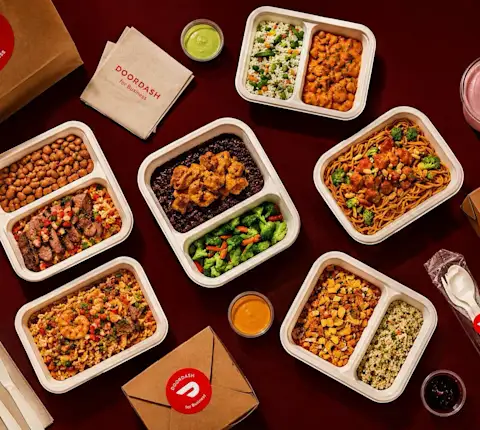
Ordering lunch for eight people sounds simple until you're collecting orders over Slack, someone changes their mind, and three receipts land in your inbox a week later. A DoorDash group order fixes most of that. You share one link, everyone adds what they want, and the food shows up together.
This guide walks through how group orders work for teams using DoorDash for Business, from setting a budget to checkout. Ordering with friends on your personal account? The DoorDash Help Center covers that.
What Is a DoorDash Group Order?
A DoorDash Group Order is a shared cart. One person picks the restaurant and sends a link, each person adds their own meal, and everything arrives in a single delivery. Instead of a dozen separate orders, fees and drop-offs, you deal with one.
Keep in mind that each group order link is its own delivery. If you start two carts for the same lunch, expect two Dashers.
DoorDash Group Orders at a Glance
Best for: in-person teams of up to 15 people
How it works: one shared link, everyone adds their own meal
Delivery: one delivery per group order
Budget: one per-person spending limit per order
Billing: company account, or everyone pays separately
Extras: preferred Dashers and VIP support at no added cost
Planning team lunches on a regular schedule? Meal Manager brings restaurant selection, per-person budgets, reminders, and automatic checkout together in a shared meal calendar.
How Group Orders Work With a Business Account
Anyone with a DoorDash account can start a group order. Running it through DoorDash for Business adds the parts that matter at work:
A per-person budget. You set a spending limit, and the cart tracks it as people add items.
Company billing. Orders go to the company account, so nobody has to submit a receipt.
A shared meal calendar. Plan group orders ahead and send your team one link to see what's coming up.
Preferred Dashers and VIP support. Group orders go to Dashers with a 4.7+ rating and 100+ deliveries when available, and you get access to a dedicated support team. Neither costs extra.
Group Orders work best for in-person teams of up to 15 people, like a project kickoff lunch or a Friday team meal.
How to Do a Group Order on DoorDash for Your Team
There are two ways to start. Use the admin portal calendar when you're planning ahead, or start from a restaurant page when you need lunch today.
Option 1: Plan Ahead From the Admin Portal Calendar
In the admin portal, click Start Group Order.
Choose your delivery address or add a new one with delivery instructions. Saved addresses can't be edited, so double-check them. If something's off, delete the address and add it again.
Click New Order, pick a delivery time, and add one or more restaurants.
Set a spending limit per person and click Start Group Orders.
Click Share Meal Calendar and copy the link for your team.
Option 2: Start a Group Order From a Restaurant Page
Check that the delivery address and instructions at the top of the page are right.
On the restaurant's page, click Group Order.
Choose how you want to pay and click Start Group Order.
Click Invite, then Copy Link, and share it with your team.
This is also how teammates who aren't admins can start a group order.
How Employees Add Their Meals
Your team opens the calendar link or the invite link, logs in to DoorDash, and adds their items. As they add items, a flag shows how much budget they have left, so nobody's doing math at their desk.
Checking Out and Tracking the Delivery
Once everyone's in, the person who created the cart checks out. Checkout opens within 24 hours of the delivery time, from either the calendar or the restaurant page. Before you click Place Order, confirm the delivery window, address, instructions and payment.
After that, anyone in the order can follow it on the tracking page and gets a notification when the food arrives.
How Payment Works on a DoorDash Group Order
You pick one of two setups when you start the order:
The company pays. Everyone orders within the per-person budget, and the total goes on the company account.
Everyone pays separately. Each person checks out for their own items, using their own card or their Meal Budgets balance. If someone goes over budget, they cover the difference with a debit or credit card.
Choose carefully, because you can't switch the payment option after the group order is created. You'd have to delete the cart and start over.
With split billing, the delivery fee is divided evenly, service fees are split based on what each person ordered, and tips stay private. One more thing: alcohol can't be added to a split billing order.
Tips for a Smooth Team Group Order
Send the link early. For a noon lunch, share it first thing in the morning with a clear cutoff time.
Pick the menu before you start. Once the link is created, you can't edit the group order.
Plan one budget per order. Each group order gets one per-person limit, so different budgets or delivery windows need separate orders.
Watch your cart count. Every cart is its own delivery. If you're ordering from two restaurants, line up the delivery times so the team can still eat together.
Write clear delivery instructions. Floor, suite, who to call at reception. It saves the Dasher a few minutes and gets the food to you warm.
Group Orders vs. Catering vs. Meal Manager
Group Orders aren't the only way to feed a team in the office. Here's how they compare:
Option | Best for | Who orders |
|---|---|---|
Quick, one-off meals for up to 15 people | Everyone picks their own meal | |
Larger events like all-hands meetings or trainings | One organizer orders for the group | |
Recurring team lunches on a set schedule | Employees choose from restaurants you pick, and meals arrive together |
If your group is bigger than 15 or the meal is part of a bigger event, catering is usually the better fit, where it's available in your city.
Start Your Next Team Group Order
Group orders take the back-and-forth out of feeding a small team: one link, one delivery, one bill. If you don't have an account yet, you can create a DoorDash for Business account and start your first group order right away.
Frequently Asked Questions
Can you split payments on a DoorDash group order?
Yes. Choose Everyone Pays Separately when you create the group order, and each person pays for their own items. With a business account, they can use their Meal Budgets balance and cover anything extra with a card.
How many people can join a DoorDash group order for work?
Group Orders through DoorDash for Business are built for up to 15 in-person employees. For larger groups, catering is usually a better fit.
How far in advance can you schedule a group order?
With DoorDash for Business, you can plan a group order up to a week ahead from the admin portal calendar.
Does a business group order cost extra?
No. Preferred Dashers and VIP support for group orders come at no added cost. Standard delivery and service fees still apply.