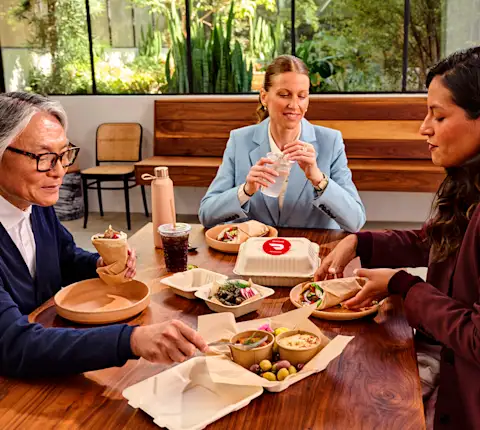
Employees get more work done when they have time to recharge for lunch, so if you’re looking for ways to boost productivity, why not start with a fun company lunch and employee meals.
Company lunch is not just a nice-to-have but a must-have
Whether on site or in the spare bedroom that’s been converted to a home office, we’re so busy these days that it’s easy to skip lunch and keep powering through work. It’s so important for your employees to take that midday break. The benefits range from physical and mental ones. While skipping lunch may seem like a time saver, it actually will do more harm than good. Remind your employees of these benefits:
Taking time for lunch recharges your team for the rest of the day. In one survey, almost 90% of participating employees said their lunch break refreshes them.
Regular lunches make for happier employees. That same survey found that 81% of people were eager to make positive contributions to their companies after taking a lunch break.
It could increase productivity. It’s not surprising that 63% of respondents in a survey said they got more work done thanks to a lunch break.
A lunch break can help with your employee’s work life balance. Whether it’s sitting down to business lunches or solo employee meals, research found lunch and other workday breaks give employees time to decompress from job-related stress, which boosts their mental and physical health.
It’s even better when your employees can share a meal. It’s an opportunity to foster camaraderie and teamwork while your team members get to know each other in a relaxed atmosphere. A Cornell University study found that firefighter squads that shared meals performed better on the job compared to those whose members dined separately.
With some creativity, you can come up with some fun office and work-from-home lunch ideas that bring your team together while they enjoy a satisfying meal:
8 Virtual lunch ideas for a dispersed workforce
1. Set up a virtual cafeteria.
Your employees don’t have to eat alone if they’re working from home. Create a link on your company’s video conference platform of choice and keep it open between noon and 1 p.m. for anyone who wants to eat lunch “together.”
2. Go on a world tour.
Each week, pick a different global cuisine for a themed lunch you can order from home (Thai Tuesdays, anyone?). DoorDash works with over 450k restaurants, so your employees have plenty of tasty options representing a range of international flavors. And you don’t have to sacrifice taste for nutritional value, as numerous restaurants are serving delicious, healthy food, from Nopalito’s made-from-scratch, authentic Mexican cuisine in San Francisco to INDAY’s Indian/Mediterranean fusion in New York City. Employees can order food for work with Expensed Meal Credits, which are delivered to their homes, or with a DashPass membership, which comes with $0 delivery and reduced service fees.
3. Take online lunches outdoors.
Encourage groups of employees to take lunch together while on video calls from their patios, backyards, apartment balconies, or other outdoor spaces. This fun work-from-home lunch idea offers some great benefits; research shows that employees who take work breaks in a place surrounded by nature enjoy increased relaxation, well-being, and job satisfaction.
4. Make a game of it.
Liven up work-from-home lunches with some activities that allow your employees to interact with each other. Test your employees’ knowledge of the company with a trivia contest. Fire up your music streaming account and play Name that Tune. Of course, give out prizes, such as DoorDash Employee Gift Cards.
5. Ring in the holidays.
Add a festive flair to your week with this work-from-home lunch party idea. Commemorate the major holidays by asking everyone to prepare or order a themed lunch, such as turkey and cranberry sandwiches for Thanksgiving, or all-American food around the Fourth of July. Costumes and decorations create a celebratory spirit for your online get-together. Make it even more special by handing out DoorDash Employee Gift Cards.
6. Eat and run (or work out).
If a group of employees would get together for a walk at the office, they can stay active while working remotely, too. Employees can simultaneously log in to a Zoom or online workout and get some cardio or yoga poses during their break. Research shows that midday exercise increases job motivation and performance.
7. Make it entertaining.
Give your talented employees the spotlight. Schedule regular virtual lunches with your team members and have them provide the entertainment. Your salesperson who plays classical guitar or receptionist who moonlights as a singer in a jazz band could create a special ambiance for your virtual lunch.
8. Think outside the (lunch)box.
If the afternoons are tough to schedule with your team members, don’t limit yourself to work-from-home lunch ideas. A breakfast buffet is a great way to start the day. Alternatively, you can host virtual happy hours or later afternoon treat breaks with cookies or boba tea delivered via DoorDash.
6 Quick and easy work lunch ideas for office employees
1. Go bowl-ing.
This DIY office lunch buffet idea lets employees build a healthy lunch that’s bountiful in whole foods such as veggies, grains, and legumes. Set up stations where employees can start with a base of grains or greens, add veggies or lean protein such as grilled chicken, then sprinkle on toppings such as chopped nuts, sesame seeds, or a zesty dressing. This is a great complement to any employee wellness program because it reinforces healthy eating habits.
2. Host a pizza party.
Everyone’s got their favorite pizza place. Why not have a contest to see which one tops them all? Order pies from a handful of local spots and have employees sample them all and rate their favorites. Remember to take the pizzas out of the box to prevent spoilers.
3. Belly up to the bar.
Not the kind that serves alcohol, of course—we’re talking the “build your own” buffets. Pick a food that gives you lots of customization options, such as tacos, salads, baked potatoes, burgers, and ramen or pho.
4. Plan a potluck.
Ask your employees to bring in their favorite food. During lunch, go around the table where everyone can share the story behind their dish. It may help to have a sign-up list—you’ll know what everyone’s bringing and avoid having a meal that’s all desserts.
5. Organize a contest.
Ask employees to bring in their best guacamole (or chili, salsa, or other dish) and have everyone vote on their favorite. The winner gets a DoorDash Employee Gift Card.
6. Give your employees a say.
Let everyone vote on a restaurant or cuisine for your next employee lunch. Giving your Employee of the Month the power to choose the meal is a nice perk as well. In either case, make a list of options they can choose from; once a restaurant is selected, you can use DoorDash’s Expensed Meal Credits so everyone can select their own food for work.
DoorDash for Business makes it easy to host an office or work-from-home lunch. Contact us to make your next employee lunch a success or download our ebook The Future of the "Office" to learn about how companies are leveraging food delivery to transition into hybrid work models.